> For the complete documentation index, see [llms.txt](https://fancyloves.gitbook.io/frontendtech/llms.txt). Markdown versions of documentation pages are available by appending `.md` to page URLs; this page is available as [Markdown](https://fancyloves.gitbook.io/frontendtech/angularjs/fundamentals/component.md).
# Component
## Hierarchical Component
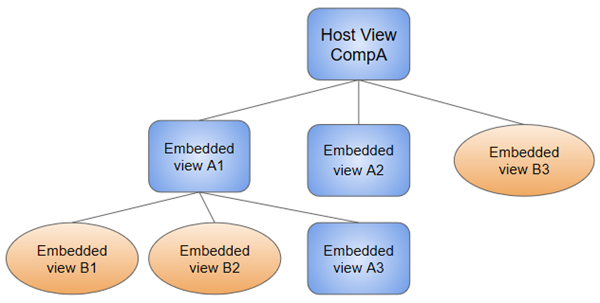
When you create a component, it is associated directly with a single view, called the `host view`. The host view can be the root of a view hierarchy, which can contain embedded views, which are in turn the host views of other components. Those components can be in the same NgModule, or can be imported from other NgModules. Views in the tree can be nested to any depth.

## @Component configuration options
* **selector**: tells Angular to create and insert an instance of this component wherever it finds the corresponding tag in template HTML. e.g. \\
* **templateUrl**: The module-relative address of this component's HTML template. Alternatively, you can provide the HTML template inline, as the value of the template property. This template defines the component's host view.
* **providers**: 定義在 Component providers 的為 Local (定義在 Module providers 的為 global). An array of dependency injection providers for services that the component requires.
## Data Binding
reference [here](/frontendtech/angularjs/bindings/data-binding.md)
You can always bind to a **public property** of a component in its **own** template. The component author is in complete control of those bindings. It **doesn't** have to be an Input or Output property.
```markup
![]() ```
But other components shouldn't have that kind of unrestricted access. Outside components should only be able to bind to the component's public binding API. You'd have a hard time supporting your component if anyone could bind to any of its properties.
The Angular compiler won't bind to properties of a **different** component unless they are **Input** or **Output** properties. Angular requires the `@Input()` and `@Output()` decorators to identify properties that outside components are allowed to bind to.
```markup
```

## Declaring Input and Output properties
The data bound properties are annotated with @Input() and @Output() decorators.
```javascript
src/app/hero-detail.component.ts
@Input() hero: Hero;
@Output() deleteRequest = new EventEmitter();
```
Alternatively, you can identify members in the inputs and outputs arrays of the directive metadata
```javascript
src/app/hero-detail.component.ts
@Component({
inputs: ['hero'],
outputs: ['deleteRequest'],
})
```
```
But other components shouldn't have that kind of unrestricted access. Outside components should only be able to bind to the component's public binding API. You'd have a hard time supporting your component if anyone could bind to any of its properties.
The Angular compiler won't bind to properties of a **different** component unless they are **Input** or **Output** properties. Angular requires the `@Input()` and `@Output()` decorators to identify properties that outside components are allowed to bind to.
```markup
```

## Declaring Input and Output properties
The data bound properties are annotated with @Input() and @Output() decorators.
```javascript
src/app/hero-detail.component.ts
@Input() hero: Hero;
@Output() deleteRequest = new EventEmitter();
```
Alternatively, you can identify members in the inputs and outputs arrays of the directive metadata
```javascript
src/app/hero-detail.component.ts
@Component({
inputs: ['hero'],
outputs: ['deleteRequest'],
})
```